Usage Guide
This document illustrates how to use the condition package.
A Sample Dataframe
For illustration purpose, let’s first get a sample dataframe.
In [1]: import os

In [2]: import pandas as pd

In [3]: from condition import *

In [4]: df = get_test_df()

In [5]: df.tail(10)
Out[5]:
                        value
date       A  B  C
2000-03-31 a5 b4 c1 -2.038585
                 c2  0.007462
                 c3 -0.876126
                 c4 -0.134550
                 c5  0.933113
              b5 c1  1.699962
                 c2  0.651283
                 c3 -1.006646
                 c4 -0.148893
                 c5  0.277677
The data frame has four index levels: date, A, B, C and a single column: value. The below conditions are constructed based on this data frame.
Basics
Field
All conditions are defined on fields. Field is a simple object created from a str and denotes a column in a pandas DataFrame or a sql column.
In [6]: Field('Col1')
Out[6]: Col1
Field List
To make it easy to refer to all fields, you can create a field list. You can do it with a list of strings.
In [7]: fl = FieldList(['date', 'A', 'B', 'C', 'value'])

In [8]: fl
Out[8]: FieldList [A,B,C,date,value]
You can also create a field list from a dataframe. The fields are the index names plus the columns, namely, the index levels and columns are treated in the same way.
In [9]: fl2 = FieldList.from_df(df)

In [10]: fl2
Out[10]: FieldList [A,B,C,date,value]
After creating a field list, you can refer to its field as an attribute.
In [11]: fl.A
Out[11]: A

In [12]: fl.B
Out[12]: B

In [13]: fl.date
Out[13]: date

In [14]: fl.value
Out[14]: value
You can also create a Field directly. But using a FieldList gives you the benefit of validation
and autocompletion.
In [15]: Field('A') # same as fl.A
Out[15]: A

In [16]: Field('B') # same as fl.B
Out[16]: B
Field Condition
A field condition is formed by:
Field Operator valueAll comparision operators (<,<=,>,>=,==,!=)
are supported. Besides, in and not in semantics are supported by using == and != with a collection,
such as a list, a set or a tuple. Please note that the type of each item in the collection must be the same.
When printed, a condition’s __str__ method is called which returns a SQL where condition clause. When directly referenced,
its __repr__ method is called which returns a str that can be parsed back to a condition. In the repr format,
T() is for converting a str to a datetime.
In [17]: cond = (fl.A == 'a1')  # cond is a FieldCondtion variable

In [18]: print(cond)  # __str__ format
A = 'a1'

In [19]: cond         # __repr__ format
Out[19]: fl.A = 'a1'

# typically you need not to assign it to a variable. We will see later.
In [20]: fl.value >= 0
Out[20]: fl.value >= 0

In [21]: fl.date <= pd.to_datetime('20020101')
Out[21]: fl.date <= T('2002-01-01 00:00:00')

# in and not_in
In [22]: fl.A == (['a1', 'a3'])
Out[22]: fl.A == ('a1','a3')

In [23]: fl.B != ( ['b3', 'b5'])
Out[23]: fl.B != ('b3','b5')
Value Types
The type of value in the FieldCondition is important. For in and not in,
all the elements of the collection need to be the same type. The type decides two things:
# how to format a result string # how to convert a string to the correct type before comparision
Currently supported types are: all numeric types, a string (quoted), a datetime or pd.Timestamp.
And Condition
An And condition can be created by a constructor with a list of conditions.
In [24]: and1 = And(
   ....:         [
   ....:             fl.date >= pd.to_datetime('20000101'),
   ....:             fl.date <= pd.to_datetime('20000131'),
   ....:             fl.A == 'a1 a3'.split(),
   ....:             fl.C != 'c3 c5'.split(),
   ....:         ]
   ....:     )
   ....:

In [25]: and1         # repr format
Out[25]: And([fl.A == ('a1','a3'), fl.C != ('c3','c5'), fl.date <= T('2000-01-31 00:00:00'), fl.date >= T('2000-01-01 00:00:00')])

In [26]: print(and1)  # str format

	(A in ('a1','a3')
	and C not in ('c3','c5')
	and date <= '2000-01-31 00:00:00'
	and date >= '2000-01-01 00:00:00')
or by using & operator:
In [27]: and2 = ((fl.date >= pd.to_datetime('20000101'))
   ....:         & (fl.date <= pd.to_datetime('20000131'))
   ....:         & (fl.A == 'a1 a3'.split())
   ....:         & (fl.C != 'c3 c5'.split())
   ....:         )
   ....:

In [28]: print(and2)

	(A in ('a1','a3')
	and C not in ('c3','c5')
	and date <= '2000-01-31 00:00:00'
	and date >= '2000-01-01 00:00:00')
Note
Although it seems & is more convenient, it is a bitwise operator and its precedence is
higher than ==, >= and etc.. This can cause surprising errors.
For example, fl.A == 'a1' & fl.B == 'b1' will report error because it is interpreted as
fl.A == ('a1' & fl.B) == 'b1'. For this reason, it is safer to use the first approach,
or the constructor with a list of conditions. If you still want to use &, make sure you
use () to surround the field conditions such as: (fl.A == 'a1') & (fl.B == 'b1').
The above two yield the same result. But the first approach can be more efficient because the second approach creates one intermediate immutable condition object for each two conditions.
Or Condition
An Or condition can be created by a constructor with a list of conditions.
In [29]: or1 = Or(
   ....:         [
   ....:             fl.date >= pd.to_datetime('20000101'),
   ....:             fl.C != ('c3 c5'.split()),
   ....:         ]
   ....:     )
   ....:
or by using | operator:
In [30]: or2 = (fl.date >= pd.to_datetime('20000101')) | (fl.C != ('c3 c5'.split()))

In [31]: or2
Out[31]: Or([fl.C != ('c3','c5'), fl.date >= T('2000-01-01 00:00:00')])
The above two yield the same result. But the first approach can be more efficient because the second approach creates one intermediate immutable condition object for each two conditions.
Note
Although it seems | is more convenient, it is a bitwise operator and its precedence is
higher than ==, >= and etc.. This can cause surprising errors.
For example, fl.A == 'a1' & fl.B == 'b1' will report error because it is interpreted as
fl.A == ('a1' | fl.B) == 'b1'. For this reason, it is safer to use the first approach,
or the constructor with a list of conditions. If you still want to use |, make sure you
use () to surround the field conditions such as: (fl.A == 'a1') | (fl.B == 'b1').
Features
Immutability
A condition object is immutable after construction. You can use it in multi threads safely.
Serializablility
A condition object can be serialized(or pickled) to storage or for network transport.
Equality Test
You can check if two condition objects are the same with ==.
Note that for sub conditions and collection values, order does not matter as shown below.
In [32]: (fl.A == ['a1', 'a5']) == (fl.A == ('a5', 'a1'))
Out[32]: True

In [33]: cond1 = And([fl.A == ['a1', 'a5'], fl.C == {'c2', 'c4'}])

In [34]: cond2 = And([fl.C == ('c4', 'c2'), fl.A == ('a5', 'a1')])

In [35]: cond1 == cond2
Out[35]: True
Hashcodes
You can use hash() to get a hashcode for a condition object. Therefore a condition object can be used
as a key in a dict and set. The hashcode is also order independent as for the equality test.
Non Standard Field Names
If a field name is not a valid identifier, for example, “with space”, “state.ca”, in FieldList,
it will be converted to an identifier by replacing special characters with “_”. When there is a conflict,
a number is added to make it unique. The above names become fl.with_space, fl.state_ca. Alternatively,
you can get the field with the name directly, fl["with space"] or Field("with space").
The original field name will be enclosed with " (double quote)
when sql is rendered or ` (backtick) when to_df_query() is rendered. On the other hand,
to_pyarrow_filter() needs no special treatment.
For sql, different DB may need different way to enclose such names, if your DB needs a different way to enclose special columns, you have two choices:
Use
dbmap;Set
SQL_ID_DELIM_LEFTandSQL_ID_DELIM_RIGHTenv variables.
See below examples:
In [36]: fl = FieldList(["13abc", "with space", "with.space", "params.p1"])

In [37]: fl._13abc.name
Out[37]: '13abc'

In [38]: fl.with_space.name
Out[38]: 'with space'

In [39]: fl["with space"].name
Out[39]: 'with space'

In [40]: fl.with_space1.name
Out[40]: 'with.space'

In [41]: fl.params_p1.name
Out[41]: 'params.p1'

In [42]: c = (fl.with_space > 2)

In [43]: print(c.to_df_query())
(`with space` > 2)

In [44]: print(c.to_sql_where_condition())
"with space" > 2

# option 1
In [45]: print(c.to_sql_where_condition(db_map={"with space" : "`with space`"}))
`with space` > 2

# option 2
In [46]: os.environ["SQL_ID_DELIM_LEFT"] = "["

In [47]: os.environ["SQL_ID_DELIM_RIGHT"] = "]"

In [48]: print(c.to_sql_where_condition())
[with space] > 2
And, Or Flatten
To simplify the condition object, when you create a nested And or Or condition,
The structure is automatically flattened. It means that A and (B and (C and D))) is
flattened to A and B and C and D. Similarly, A or (B or (C or D))) is flattened
to A or B or C or D.
Example:
In [49]: fl = FieldList.from_df(df)

In [50]: Or(
   ....:         [
   ....:             Or([fl.date >= pd.to_datetime('20000101'),
   ....:                 fl.C != ('c3 c5'.split())]),
   ....:             Or([fl.A=='a1']),
   ....:             fl.B == 'b2'
   ....:         ]
   ....:     )
   ....:
Out[50]: Or([fl.A = 'a1', fl.B = 'b2', fl.C != ('c3','c5'), fl.date >= T('2000-01-01 00:00:00')])

In [51]: And(
   ....:         [
   ....:             And([fl.date >= pd.to_datetime('20000101'),
   ....:                 fl.C != ('c3 c5'.split())]),
   ....:             And([fl.A=='a1']),
   ....:             fl.B == 'b2'
   ....:         ]
   ....:     )
   ....:
Out[51]: And([fl.A = 'a1', fl.B = 'b2', fl.C != ('c3','c5'), fl.date >= T('2000-01-01 00:00:00')])
As shown above, a nested And or Or condition is automatically flattened
to be a single level And or Or condition.
Normalization
The method normalize() converts the condition to be one of the following:
a
FieldConditionan
Andwith a list of subFieldConditionan
Orwith a list of sub conditions as defined above.
In some cases, e.g., pyarrow filtering, the above restrictions must be followed. Any condition can be normalized to the above form in an equalivent way.
See below example and also its visualiation in the next section:
In [52]: cond1 = And([
   ....:     fl.A == 'a1',
   ....:     Or([
   ....:         fl.B == 'b1',
   ....:         fl.C == 'c1',
   ....:         And([
   ....:             fl.value >= 3,
   ....:             fl.value <= 5
   ....:         ])
   ....:     ]),
   ....:     Or([
   ....:         fl.B == 'b2',
   ....:         fl.C == 'c2'
   ....:     ])
   ....: ])
   ....:

In [53]: print(cond1)

	(
		(
			(value <= 5
			and value >= 3)
		or B = 'b1'
		or C = 'c1')
	and
		(B = 'b2'
		or C = 'c2')
	and A = 'a1')

In [54]: print(cond1.normalize())

	(
		(A = 'a1'
		and B = 'b1'
		and B = 'b2')
	or
		(A = 'a1'
		and B = 'b1'
		and C = 'c2')
	or
		(A = 'a1'
		and B = 'b2'
		and C = 'c1')
	or
		(A = 'a1'
		and B = 'b2'
		and value <= 5
		and value >= 3)
	or
		(A = 'a1'
		and C = 'c1'
		and C = 'c2')
	or
		(A = 'a1'
		and C = 'c2'
		and value <= 5
		and value >= 3))
Visualization
You can visaulize the condition structure with cond.visualize() method.
It requires an extra package graphviz in your system environment.
See graphviz for installation instructions.
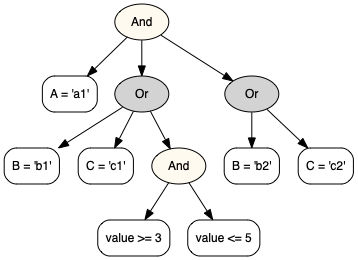
The cond1 in the previous section
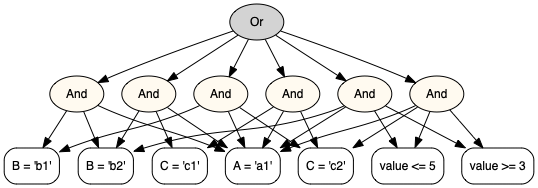
The visualization of cond1.normalize().
String <=> Condition
As mentioned before, when printed, a condition’s __str__ method is called which returns a SQL where condition clause.
When directly referenced or repr() is called, it returns a string which can be parsed back to a condition. In the repr format,
T() is for converting a str to a datetime.
The parse() method is safe in that no irrelvant function/class can be called in the string. When called, a fl: FieldList
variable must be presented, although the variable name can be customized.
Examples:
In [55]: fl = FieldList(['date', 'A', 'B', 'C', 'value'])

In [56]: cond1 = Condition.parse("(fl.A>T('20000101')) & (fl.B==['b1', 'b2'])  & (fl.C>=100)")

In [57]: cond1
Out[57]: And([fl.A > T('2000-01-01 00:00:00'), fl.B == ('b1','b2'), fl.C >= 100])

In [58]: Condition.parse("And([fl.A>T('20000101'), fl.B==['b1', 'b2'], fl.C>=100])")
Out[58]: And([fl.A > T('2000-01-01 00:00:00'), fl.B == ('b1','b2'), fl.C >= 100])

In [59]: Condition.parse(repr(cond1))
Out[59]: And([fl.A > T('2000-01-01 00:00:00'), fl.B == ('b1','b2'), fl.C >= 100])

In [60]: try:
   ....:     Condition.parse("dir()")   # unsafe call should result in an error.
   ....: except:
   ....:     print("An error")
   ....:
An error
Split of a Condition
The method split() splits the condition to a new condition which only contains the passed in fields.
This method is used in the following scenario:
A combined data item is joined from two or more sub data sources.
The condition is defined on the combined data.
Use this method to get a split condition to be applied to the sub data sources with the fields list in the sub data sources.
After the data is joined, apply the original condition on the combined data.
See the below example:
In [61]: cond = And(
   ....:     [
   ....:         fl.A == "a1",
   ....:         Or([fl.B == "b1", fl.C == "c1", And([fl.value >= 3, fl.value <= 5])]),
   ....:         Or([fl.B == "b2", fl.C == "c2"]),
   ....:     ]
   ....: )
   ....:

In [62]: cond1 = cond.split('notExisted')

In [63]: assert cond1 == EMPTY_CONDITION

In [64]: cond2 = cond.split(["A"])

In [65]: print(cond2)
A = 'a1'

In [66]: cond3 = cond.split(["B", "C"])

In [67]: print(cond3)

	(B = 'b2'
	or C = 'c2')
In the above example:
cond1does not contain any field incond, so it is split to an empty condition which means no row will be filtered out.cond2only contains fieldA, so it is split to the first sub conditionfl.A == "a1".cond3does not contain fieldvalue, therefore,And([fl.value >= 3, fl.value <= 5])]is ignored and assumed to beTrue, then the firstOrcondition is evaluated toTrue. Thus only the secondOrcondition is kept.
Usage Contexts
Evaluation
The eval() method evaluates the condition to True or False
against the data record you provide. The data record maps from a field
to a value to be compared with the FieldCondition’s.
Optionally, you can ask it to convert value in record_dict to the FieldCondition
value type before comparision. Sometimes such conversion
is needed, for example, in pyarrow partition filtering.
Note that if you have a large number of records, the recommended way to evaluate all
of them in batch mode is to create a pandas DataFrame from the records and then call
condition.query(df). You can install numexpr package for much faster performance.
For example, the below code implements hive partition filtering:
In [68]: paths = [
   ....:             'A=a1/B=b1/C=c1',
   ....:             'A=a2/B=b1/C=c1',
   ....:             'A=a3/B=b1/C=c2',
   ....:         ]
   ....:

In [69]: def path2record(path):
   ....:     return {p.split('=')[0]:p.split('=')[1] for p in path.split('/')}
   ....:

In [70]: field_list = FieldList('A B C'.split())

In [71]: cond = And([
   ....:     field_list.A == ('a1 a3'.split()),
   ....:     field_list.C == 'c2',
   ....:     field_list.B != 'b2',
   ....: ])
   ....:

In [72]: records = {p:path2record(p) for p in paths}

In [73]: records
Out[73]:
{'A=a1/B=b1/C=c1': {'A': 'a1', 'B': 'b1', 'C': 'c1'},
 'A=a2/B=b1/C=c1': {'A': 'a2', 'B': 'b1', 'C': 'c1'},
 'A=a3/B=b1/C=c2': {'A': 'a3', 'B': 'b1', 'C': 'c2'}}

In [74]: filtered_path = [p for p, record in records.items() if cond.eval(record, type_conversion=True)]

In [75]: filtered_path
Out[75]: ['A=a3/B=b1/C=c2']
Dataframe.query Usage
After you create the condition, you can use it to query a dataframe.
In [76]: and2.to_df_query() # format as a df query string.
Out[76]: "((A in ('a1','a3'))&(C not in ('c3','c5'))&(date <= '2000-01-31 00:00:00')&(date >= '2000-01-01 00:00:00'))"

In [77]: res = df.query(and2.to_df_query())

In [78]: res.tail()
Out[78]:
                        value
date       A  B  C
2000-01-31 a3 b4 c2  0.610100
                 c4 -2.207723
              b5 c1  1.002171
                 c2 -1.363013
                 c4 -0.315741
Alternatively:
In [79]: res = and2.query(df)

In [80]: res.tail()
Out[80]:
                        value
date       A  B  C
2000-01-31 a3 b4 c2  0.610100
                 c4 -2.207723
              b5 c1  1.002171
                 c2 -1.363013
                 c4 -0.315741
Pyarrow Partition Filtering
The condition can be converted to and from a pyarrow filter. The filter is passed to
pyarrow.parquet.ParquetDataset or pandas.read_parquet() in order
to read only the selected partitions, thereby increase efficiency.
In contrast with the strict structure for pyarrow filters, any condition can be converted to pyarrow filters. The condition will be normalized first to comply with pyarrow requirements.
Note
Please note that if a field is not a partition key, its condition will be silently ignored.
You should follow up with condition.query(df) to filter out unnecessary rows.
Examples:
In [81]: import tempfile

In [82]: and1 = And(
   ....:         [
   ....:             fl.date >= pd.to_datetime('20000101'),
   ....:             fl.date <= pd.to_datetime('20000131'),
   ....:             fl.A == ('a1 a3'.split()),
   ....:             fl.C != ('c3 c5'.split()),
   ....:         ]
   ....:     )
   ....:

# convert to pyarrow filter
In [83]: and1.to_pyarrow_filter()
Out[83]:
[('A', 'in', {'a1', 'a3'}),
 ('C', 'not in', {'c3', 'c5'}),
 ('date', '<=', Timestamp('2000-01-31 00:00:00')),
 ('date', '>=', Timestamp('2000-01-01 00:00:00'))]

# convert back from pyarrow filter
In [84]: cond = Condition.from_pyarrow_filter(and1.to_pyarrow_filter())

In [85]: print(cond)

	(A in ('a1','a3')
	and C not in ('c3','c5')
	and date <= '2000-01-31 00:00:00'
	and date >= '2000-01-01 00:00:00')

In [86]: with tempfile.TemporaryDirectory() as t:
   ....:     df = df.reset_index()
   ....:     df.to_parquet(t, partition_cols=['A', 'C'])
   ....:     res = pd.read_parquet(t, filters=and1.to_pyarrow_filter())
   ....:     assert set(res.A.unique()) == set(['a1', 'a3'])
   ....:     assert set(res.C.unique()) ^ set(['c3', 'c5'])
   ....:     res2 = and1.query(res)
   ....:     assert res2.date.min() == pd.to_datetime('20000101')
   ....:     assert res2.date.max() == pd.to_datetime('20000131')
   ....:
Usage Context Extension
The above usage contexts, even visualize(), are actually implemented as plug-ins to the condition package.
A plug-in is an implementation of ConditionApplication which defines behaviors
such as on_start, applyFieldCondition, applyAndCondition, applyOrCondition
and on_end.
You can create your own plug-in by following existing examples. Once you are done, you
can optionally register_application to use it as if it were built in
the Condition class. See test_condition.py for examples.
SQL Generation
Basic SQL
The condition can be used to generate sql. condition.sql package contains a method to
render jinja2 sql template.
You need to install jinja2 package before you use it.
In [87]: from condition.sql import render_sql

In [88]: sql = """
   ....:     select *
   ....:     from my_table
   ....:     where {{where_condition}}
   ....: """
   ....:

In [89]: print(render_sql(sql, and1))

    select *
    from my_table
    where
	(A in ('a1','a3')
	and C not in ('c3','c5')
	and date <= '2000-01-31 00:00:00'
	and date >= '2000-01-01 00:00:00')
In this example, where_condition is replaced with a sql clause constructed
from this condition.
SQL with Column Mappings
The fields and the table columns may not be the same.
Also in sql, you may need to use table alias.
In those cases, you can specify a dbmap parameter
as a dict from a field name to a db column name.
In [90]: and2 = and1 & (Field("id") == 'id1')

In [91]: print(and2)

	(A in ('a1','a3')
	and C not in ('c3','c5')
	and date <= '2000-01-31 00:00:00'
	and date >= '2000-01-01 00:00:00'
	and id = 'id1')

In [92]: sql = """
   ....:     select *
   ....:     from my_table t1, my_table2 t2
   ....:     where
   ....:     t1.id = t2.id
   ....:     and {{where_condition}}
   ....: """
   ....:

In [93]: print(render_sql(sql, and2, {'A' : 't1.col1', 'C': 't2.col2', 'id': 't1.id'}))

    select *
    from my_table t1, my_table2 t2
    where
    t1.id = t2.id
    and
	(t1.col1 in ('a1','a3')
	and t2.col2 not in ('c3','c5')
	and date <= '2000-01-31 00:00:00'
	and date >= '2000-01-01 00:00:00'
	and t1.id = 'id1')
SQL with Split Conditions
The split() method can be used in sql when the sql joins multiple sub queries.
In [94]: fl = FieldList('a b c d e'.split())

In [95]: cond = And([
   ....:     fl.a == ['a1','a2'],
   ....:     fl.b > 30,
   ....:     fl.d != ['d1', 'd2']
   ....: ])
   ....:

In [96]: sql = """
   ....:     select t1.a, b, c, d, e
   ....:     from
   ....:         (select a, b, c
   ....:          from my_table
   ....:          where {{ condition.split(['a','b','c']) }}
   ....:          ) as t1
   ....:     join
   ....:         (select a, d, e
   ....:          from my_table2
   ....:          where {{ condition.split(['a','d','e']) }}
   ....:          ) as t2
   ....:         on t1.a==t2.a
   ....:     where {{condition.to_sql_where_condition(db_map=dict(a='t1.a'))}}
   ....:     """
   ....:

In [97]: print(render_sql(sql, cond))

    select t1.a, b, c, d, e
    from
        (select a, b, c
         from my_table
         where
	(a in ('a1','a2')
	and b > 30)
         ) as t1
    join
        (select a, d, e
         from my_table2
         where
	(a in ('a1','a2')
	and d not in ('d1','d2'))
         ) as t2
        on t1.a==t2.a
    where
	(t1.a in ('a1','a2')
	and b > 30
	and d not in ('d1','d2'))


# handle empty condition
In [98]: cond = And([
   ....:     fl.d != ['d1', 'd2']
   ....: ])
   ....:

In [99]: print(render_sql(sql, cond))

    select t1.a, b, c, d, e
    from
        (select a, b, c
         from my_table
         where
	1=1
         ) as t1
    join
        (select a, d, e
         from my_table2
         where d not in ('d1','d2')
         ) as t2
        on t1.a==t2.a
    where
	(d not in ('d1','d2'))
SQL with Custom Parameters
For sql, additional parameters can be set and used in the jinja2 sql template to achieve additional control.
In [100]: and1.set_param('use_join_clause', True)

In [101]: sql = """
   .....:     select *
   .....:     from my_table as t1
   .....:     {% if use_join_clause -%}
   .....:     join my_table2 t2 on t1.fpe=t2.date
   .....:     {%- endif %}
   .....:     where {{where_condition}}
   .....:     """
   .....:

In [102]: print(render_sql(sql, and1))

    select *
    from my_table as t1
    join my_table2 t2 on t1.fpe=t2.date
    where
	(A in ('a1','a3')
	and C not in ('c3','c5')
	and date <= '2000-01-31 00:00:00'
	and date >= '2000-01-01 00:00:00')
Now let’s turn use_join_clause off.
In [103]: and1.set_param('use_join_clause', False)

In [104]: print(render_sql(sql, and1))

    select *
    from my_table as t1

    where
	(A in ('a1','a3')
	and C not in ('c3','c5')
	and date <= '2000-01-31 00:00:00'
	and date >= '2000-01-01 00:00:00')
As you can see, this clause join my_table2 t2 on t1.fpe=t2.date is gone.
SQL with Like Condition
You may have noticed that a common sql condition, like,
is not supported. It is because this project is geared toward
dataframe.query() which does not support like.
However, it is possible to use the custom parameters to
work around the limitation for sql as shown below:
In [105]: and1 = And()

In [106]: and1.set_param('col_A_like', 'Par%s')

In [107]: sql = """
   .....:     select *
   .....:     from my_table as t1
   .....:     where col_A like '{{col_A_like}}'
   .....:     """
   .....:

In [108]: print(render_sql(sql, and1))

    select *
    from my_table as t1
    where col_A like 'Par%s'
This is the end. Hopefully you can find the condition package
is useful to you.